Recover lost passwords.
Free, forever.
Password Monk is a professional password recovery suite for Windows — with a file locker and AES-256 secure vault built in. GPU-accelerated. No paywall. No ads.
Everything you need, in one suite.
Six powerful workspaces — from one-click password recovery to military-grade file encryption. All bundled together, completely free.
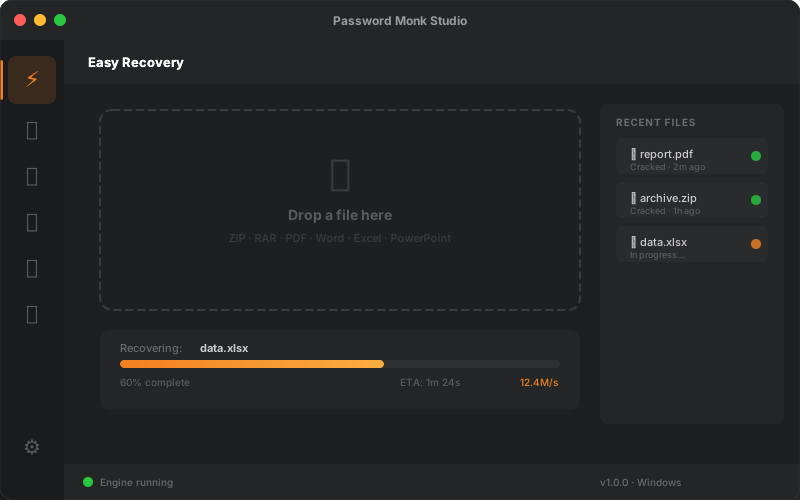
Easy Recovery
Drag-and-drop any locked file for instant one-click password recovery. Automatic format detection — no configuration needed.
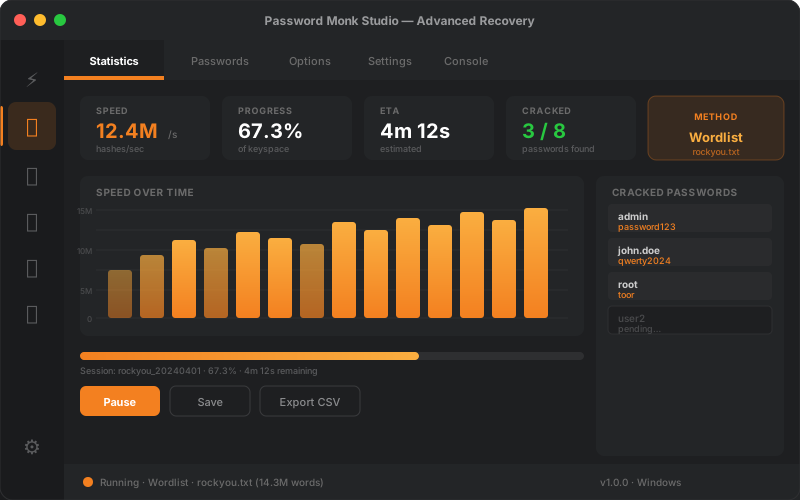
Advanced Recovery Studio
Eight recovery methods — Wordlist, Mask, Incremental, Markov, PRINCE, and more — with real-time progress charts, session save & resume, and GPU acceleration.
Hash Extractor
Native extraction of encryption signatures from ZIP, RAR, PDF, Office, KeePass, VeraCrypt, BitLocker, SSH, GPG, and Bitcoin wallets. Pure Dart — zero external dependencies.
Wordlist Manager
Manage local password dictionary libraries with 500K+ bundled entries. Import custom wordlists and organise them for targeted recovery jobs.
File Lock & Unlock
Password-protect files in their native format (ZIP, PDF, Word, Excel, PowerPoint) or strip known passwords in seconds — drag-and-drop, no conversion needed.
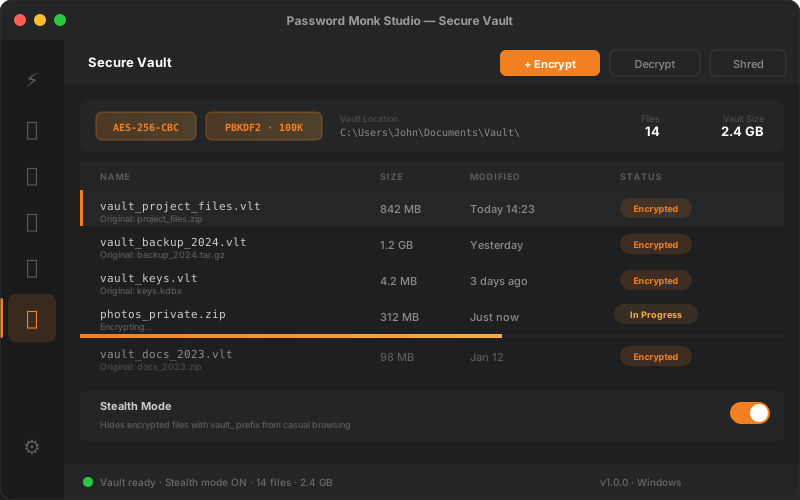
Secure Vault
AES-256-CBC encrypted storage with PBKDF2-SHA256 (100K iterations). Batch encrypt/decrypt, multi-pass file shredding, and stealth mode. All local — no cloud.
Eight Recovery Methods.
One Unified Workspace.
Choose the right attack strategy for every scenario — from fast dictionary scans to exhaustive pattern-based brute-force — and monitor everything in real time with live charts and GPU acceleration via John the Ripper.
- ✓Default (auto-chain)
- ✓Wordlist / Dictionary
- ✓Mask (pattern-based)
- ✓Incremental (brute-force)
- ✓Markov (probability-based)
- ✓PRINCE (passphrase chaining)
- ✓Single Crack
- ✓External (custom scripts)
- Session Save & Resume
- Multi-core Fork Mode
- GPU Acceleration
- Real-time Charts
Military-Grade Encryption.
Zero Complexity.
Store any file in AES-256 encrypted containers. Every file gets a unique random salt and IV — making brute-force attacks computationally infeasible. No cloud. No server. Everything stays on your machine.
- ✓ Batch encrypt or decrypt entire folders
- ✓ Multi-pass secure file shredding
- ✓ Stealth mode — hides encrypted files from casual browsing
- ✓ Works on any file type — images, documents, archives, and more
Recover passwords in three steps
No technical knowledge required.
Drop your file
Drag and drop your locked ZIP, PDF, Word, Excel, or other file anywhere in the app. Password Monk auto-detects the format.
Choose a method
Use Easy Recovery for one-click results, or choose from 8 advanced attack methods — Wordlist, Mask, Incremental, Markov, PRINCE, and more.
Get your password
Watch real-time progress with live charts. When the password is found, you're notified instantly — even if the app is minimised to the system tray.
Ready to recover your file?
Download Password Monk for Windows — free, no subscription, no credit card.
↓ Download for Windows — FreeRequires Windows 10 or later (64-bit) · All computation runs locally · No cloud, no tracking
Broad format support
Native extraction and recovery for the most common encrypted file types — no plugins or third-party tools needed.
Archives & Documents
System & Credential Hashes
Other Protected Formats
System Requirements
| Component | Minimum | Recommended |
|---|---|---|
| Operating System | Windows 10 (64-bit) | Windows 11 |
| RAM | 4 GB | 8 GB or more |
| Disk Space | 500 MB | 1 GB (for wordlists) |
| Display | 1280 × 800 | 1920 × 1080 |
| GPU (optional) | NVIDIA or AMD GPU with OpenCL support for hardware-accelerated recovery | |
| Internet | Required for activation; fully offline after initial email verification | |